A facial recognition time clock is no longer a luxury. Advanced biometric clocks are a must-have for today’s workplaces. A facial recognition time clock is the best technology for tracking employee time. It solves a multitude of problems employers are facing with their workforces.
What is a Facial Recognition Time Clock?
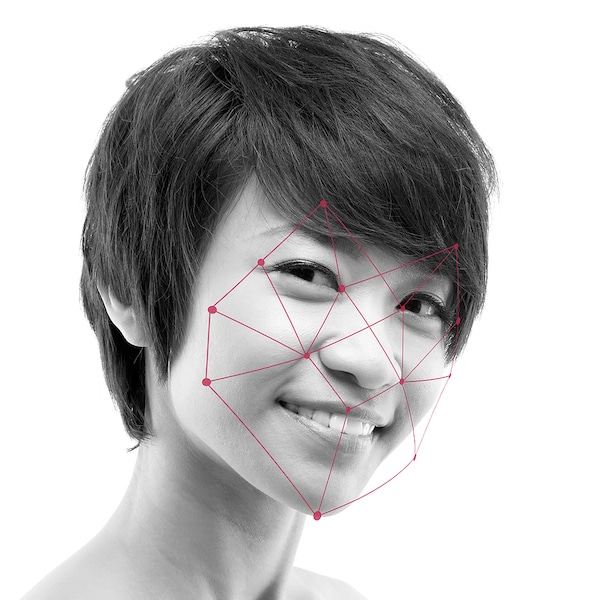
A facial recognition time clock is a hardware clock that tracks employee time, identifying the employee by their facial features. The employee stands in front of the clock and faces the scanner. The time clock identifies the employee by scanning their face and measuring key landmarks between facial features. When the employee’s identity is authenticated, the time clock records their clock-in for the shift. The timestamp is then sent to the time and attendance software where time worked is tracked on digital timecards, along with PTO accruals.
Works quickly: Touchless identification prevents bottlenecks at shift changes because the clock identifies the employee in less than a second. Slow clock-in lines reduce productivity. If each employee in a 20-person crew takes 30 seconds to punch in, that’s 50 minutes of wasted work time per week, or over three hours every month.
Accurate: A facial recognition clock identifies faces with near 100% accuracy.
Functions across the broadest range of environments and conditions: Modern face recognition technology can match an employee’s face in low light conditions or if the employee is wearing a mask. With touchless authentication, employees don’t have to remove gloves and the clock isn’t affected by dusty or dirty conditions. This versatility makes it ideal for industrial, hospitality, health care, construction and manufacturing workspaces.
Works for a wide range of skin tones, facial features, and heights: Facial characteristics are a unique and reliable identifier, regardless of age, complexion or ethnicity.
No lost key cards, fobs or passwords: Employees forget passwords and lose prox cards. To state the obvious, they can’t forget to bring their face to work.
Prevents buddy punching as it is virtually impossible to fool: When a Los Angeles restaurant adopted a face recognition clock, their total labor costs dropped the following pay period. As it turns out, two employees had been buddy punching for each other to pad their paychecks. With the new biometric clock, the jig was up.
Controls access in secure environments: A biometric time clock is essential for highly secure workspaces.
Vision+ Facial Recognition Time Clock
When considering options, it’s worth looking at the Vision+, a facial recognition time clock that works with the WorkforceHub solution. The Vision+ speeds up the process of shift clocking so employees can get to work without delay. It confirms identity in less than a second by measuring key landmarks on each employee’s face. This clock ensures that small businesses can track hours correctly for payroll, keep data safe, prevent buddy clocking, remotely screen for fever and offer a sanitary clocking experience with minimal contact. Simultaneously, the clock can scan the employee’s temperature as they clock in. If the temperature registers above a configurable threshold, this will prevent the employee from clocking in and the punch will not be recorded. This gives the manager a chance to address the issue discreetly before the employee enters the workspace. Keeping sick employees out of the work environment can prevent health concerns at the business.
Pairing the Vision+ clock with WorkforceHub creates an end-to-end, scalable HR solution tailored specifically to small businesses. WorkforceHub includes time and labor, applicant tracking, onboarding, benefits enrollment and performance management. Busy business owners, managers, and employees have more time to focus on growing the business, rather than doing time-consuming, tedious HR tasks. WorkforceHub also protects companies from compliance penalties by automating error-prone manual processes.
Frequently Asked Questions about Facial Recognition Time Clocks
Got questions? Check out our answers to common questions about facial recognition time clocks below.
Is it better than a finger scan time clock?
Although finger scanning time clocks are notably more secure than many other options on the market, there are still some drawbacks that a time clock with facial recognition can mitigate. If employees are wearing gloves, they have to take them off which slows down the clock-in process. Additionally, there is a possibility finger scanners could prove unreliable in dusty and dirty environments. Like all things in business, assessing your work environment is key to making a decision on what technology suits your business best.
Is a facial recognition clock better than an iris scanner?
Iris scanners are slow and tedious. Employees must stand within a few inches, almost touching the device. Thus, they are less hygienic than facial recognition clocks. Bonus: One of the newest additions to biometric clocks is a thermal scanner for temperature checks. An employee time clock with a thermal scanner detects their temperature while they are clocking in. This has been helpful in protecting workplaces from the spread of illness. If a time clock detects an elevated temperature, before the employee enters the workspace, it lowers the risk of an outbreak.
When does a facial recognition time clock make the most sense?
Employers in many industries are using facial recognition biometrics to better manage their workforces. Let’s look at the most common:
Food and Beverage. These businesses often have multiple shifts of varying lengths. In addition, the employee clock-in area is often a small space that gets crowded quickly if there’s a hold-up during shift changes. A facial recognition clock can promote order and efficiency for multiple teams and job roles.
Manufacturing. With a facial recognition clock, manufacturing employees don’t need to remove gloves or carry a prox card or fob. Split-second identify verification allows employees to get to their work stations without delay.
Health Care. Facial recognition is quick and sanitary. Advanced timekeeping software synced to a face recognition clock can track multiple job roles, shift differentials and multiple pay rates.
Industrial. Facial identification works better than finger or iris scans in dirty, dusty or wet work environments – and employees don’t need to remove their gloves.
Hospitality. Did you know that making beds, and working with cleaning solutions can alter the skin on the fingertips? Many hotel employers have struggled with finger-based scanning clocks due to this reason. A facial recognition clock solves the problem of worn fingertips while providing a secure clocking method for largely unsupervised teams.
Construction. This is another industry with job tasks that can cause changes to the fingertip skin. Think brick laying, cement work and framing. Worksites can also be dirty, dusty and wet. With facial recognition, employees don’t need to remove gloves or dig in their pocket for a fob or prox card.
Manage your workforce efficiently with the time-tracking solution you need and data that syncs with your payroll platform. If you currently use Gusto, a cloud-based payroll, benefits and human resource management system, you may be looking for something to manage time and labor. After all, failing to track employee hours can put your business in…
Updated April 9, 2024 What is employee time clock hardware? An employee time clock is a hardware device for tracking work time. To use it, employees ‘punch’ in/out or ‘clock’ in/out. The term ‘punch in’ stems from early employee time clock hardware that required a physical card. With a traditional mechanical time clock, the process…